

How to Make Your Phone number Private in Australia
Want to make your phone number private? Often, it’s as simple as tweaking a setting on your iPhone or Android or dialling the prefix #31# before making a call. It’s a quick trick that stops your number from appearing on the recipient's Caller ID, giving you instant control over your personal information.
Why You Should Control Who Sees Your Phone Number
Ever stopped to think why your phone number is such a hot commodity? It’s more than just a string of digits; it’s a direct line to your personal life and a key that can unlock your entire digital identity. Every time you hand it over, whether online or in person, you're sharing a piece of that privacy.
Think about it like this: your phone number is the digital equivalent of your home address. You wouldn't hand that out to every stranger you meet. The same caution should apply to your number. For example, when you get a quote for a service, you often have to provide your number. Almost like clockwork, the marketing calls and texts start rolling in. Or what about when you want to sell your old phone online? Posting your number publicly can open the door to scammers and strangers at all hours.
The Real-World Risks of an Exposed Number
Your phone number is often the key to sensitive accounts—it’s the go-to recovery method for your email, social media, and even banking. If it falls into the wrong hands, it becomes a powerful tool for scammers trying to access your private information through phishing texts or even SIM-swap attacks. That's where an attacker convinces your mobile provider to switch your number to a new SIM card they control, giving them access to your calls and messages.
Here are a few common scenarios where keeping your number private is just plain smart:
- Online Marketplaces: When you're buying or selling on platforms like Gumtree or Facebook Marketplace, using a private number means strangers don't have your direct contact details long after the deal is done.
- Signing Up for Services: Lots of online forms require a phone number for verification, but this often lands your details on marketing lists that get sold to third parties.
- Dating Apps: Sharing your personal number too early on can expose you to unwanted contact if things don't work out.
- Business Enquiries: If you’re just calling a company for information, hiding your number ensures you won’t be quietly added to a sales database without your permission.
Your number has become a universal identifier. Controlling who has access to it is one of the easiest and most effective steps you can take to protect your digital footprint.
Ultimately, managing this one simple detail is a critical first step in protecting yourself. Modern operating systems are getting better at offering robust features to help with this. As technology evolves, updates are rolled out to tackle unnecessary tracking in Australia, giving you more control than ever before. It's all about being proactive, not paranoid, and making conscious choices about how your personal data gets shared.
Quickly Hide Your Number For a Single Call
Sometimes you don't need a full-time privacy solution. You just need to make one quick, anonymous call.
Maybe you’re ringing a tradie for a quote and want to dodge the inevitable follow-up marketing calls. Or perhaps you're responding to an online ad and would rather not share your personal number just yet. For these one-off situations, there's a simple trick that works on any phone, new or old.
Instead of messing around in your phone's settings, you can use a special prefix code before you dial. This code tells your carrier: "Don't share my Caller ID for this call." The next time you dial, everything goes back to normal. It's the perfect tool for a moment of privacy without any fuss.
The Magic Codes For Australian Callers
In Australia, the code you need is #31#. It’s the universal standard supported by major carriers like Telstra, Optus, and Vodafone for both mobiles and landlines. Using it couldn't be easier.
Let's say you need to call a local business at 02 9876 5432. To make your number private for just this call, you’d simply punch this into your dialler:
#31#0298765432
When the person on the other end picks up, their phone will display something like "Private Number," "Anonymous," or "Unknown Caller" instead of your name and number. That's all there is to it.
This method works regardless of what phone you're using. It doesn't matter if it's the latest iPhone, a trusty refurbished Samsung, or even an old-school Nokia. The command is handled by the network, not the handset itself.
For a quick reference, here’s a breakdown of the codes you'll need for different Australian networks. While #31# is your go-to for mobiles, there's a different prefix for landlines.
One-Time Caller ID Block Codes for Australian Users
This table gives you a quick look at the prefix codes for hiding your number on a per-call basis across different devices and major Aussie networks.
| Device / Network | Code to Hide Number | How to Check Status |
|---|---|---|
| All Mobile Phones |
#31# followed by the phone number. |
Call a friend's phone to see "Private Number" or a similar message appear. |
| Telstra |
#31# for mobiles, 1831 for landlines. |
Both codes are standard. The status is only active for the call you make with it. |
| Optus | #31# |
Works instantly on their mobile network. No special setup is needed. |
| Vodafone | #31# |
This is the primary prefix for single-call privacy on Vodafone mobile services. |
| Landlines |
1831 followed by the phone number. |
This is the standard for most Australian landline services, including Telstra. |
It’s always a good idea to test it out by calling a friend's phone first, just to see exactly what they see on their screen. This simple trick gives you instant control over your privacy, one call at a time.
Permanently Set Your Number to Private on iPhone and Android
If you're tired of punching in a code every single time you want to make a private call, there's an easier way. Both iPhones and Androids have a built-in feature that lets you hide your Caller ID for all outgoing calls. It's the perfect ‘set and forget’ solution.
Think of freelancers using their personal mobile for work, or anyone who just wants more control over who sees their number. By changing one simple setting, all your calls will show up as "Private Number," giving you a permanent shield without any extra effort.
Hiding Your Caller ID on an iPhone
Apple makes this process incredibly straightforward. It's just a single toggle switch buried within your phone's settings. Once you flip it, your number is hidden for good (or at least until you flip it back).
Here’s the simple path to find it:
- Open the Settings app on your iPhone.
- Scroll down and tap on Phone.
- Look for the option called Show My Caller ID and select it.
- Simply tap the toggle to turn it off.
And that’s it. Your number is now hidden. If you ever need to show it for a specific call, you can either pop back into settings and toggle it on, or just use the #31# prefix before dialling to temporarily unblock it for that one call.
Adjusting Caller ID Settings on Android Devices
Android's process is just as easy, though the exact location can vary a little depending on whether you're using a Google Pixel, a Samsung Galaxy, or another brand. The steps are almost always found within your main Phone app.
Here’s a typical route you can follow:
- Open your Phone (or Dialer) app.
- Tap the three-dot menu icon, usually in the top-right corner, and select Settings.
- Look for an option like Calling accounts, Supplementary services, or Calls.
- Inside this menu, find Show my caller ID or Caller ID.
- Select Hide number.
On a Samsung device, this path might look like Phone > three-dot menu > Settings > Supplementary services > Show my caller ID. On a Google Pixel, it's more like Phone > three-dot menu > Settings > Calling accounts > [Your SIM] > Caller ID. While the names differ, the goal is always the same: find that setting and switch it to hide.
This permanent setting is a powerful tool for maintaining your digital privacy. Your phone number is a direct link to you, and controlling its visibility is a fundamental step in protecting your personal information.
This is especially true in Australia, where our phone numbers are tied to so many everyday transactions. Research shows that while a whopping 74% of Australians fret over data privacy, many don't take basic protective steps. For tech upgraders in Brisbane hitting sites like Trade.com.au for warranty-backed MacBooks or iPads, this stat hits home: your mobile number, classified as personal information under the Privacy Act, often gets bundled with other data when filling out online forms. You can discover more about Australian digital behaviours and see why managing these small settings is so important.
Using Apps and Virtual Numbers for Advanced Privacy
Sometimes, just hiding your number for a call isn’t enough. You might need a different one entirely—a temporary or secondary line that acts as a buffer between your personal life and the outside world. This is where virtual numbers and dedicated privacy apps really shine.
Think about it like this: a virtual number is like a digital P.O. box for your phone. It receives all your communications without ever revealing your home address—or in this case, your primary phone number. This separation is key to maintaining long-term privacy.
Maybe you're a small business owner in Australia who needs a separate line for customer calls but doesn't want a second physical phone. Or perhaps you're selling your old tablet on Gumtree and need a temporary number for the listing to avoid getting random calls weeks later. These services give you a 'burner' number that simply forwards calls and texts to your actual phone. The other person never sees your real details, putting you in complete control.
Choosing the Right Privacy App for You
The market for virtual number apps is growing, with plenty of options ranging from free, ad-supported services to more comprehensive subscription models. The best choice really depends on what you need it for.
-
Free Apps: These are great for very short-term use, like verifying a one-time account or posting a single online ad. Just be aware they often come with limitations, such as recycled numbers that might still get calls for the previous owner.
-
Paid Apps: For anything more consistent, a paid service is usually the way to go. They offer dedicated, clean numbers, advanced features like custom voicemail, and much better reliability. This makes them ideal for freelancers or business owners.
This level of control is more important than ever. With recent Australian Privacy Act reforms explicitly shielding phone numbers alongside IPs and cookies, businesses with over AU$3M turnover are facing tougher rules. This mirrors the caution we all should take in everyday situations, like when Brisbane locals trade in their phones for a new model. You can learn more about Australia's evolving data regulations and see why using a virtual number is such a smart, proactive step.
Getting Started with a Virtual Number
Setting up a virtual number is surprisingly straightforward and usually only takes a few minutes through an app you download on your existing smartphone.
A key benefit of many modern privacy apps is their compatibility with newer technologies. For instance, some can be linked to an eSIM, giving you a second line without needing another physical SIM card. This is incredibly handy for keeping your personal and private lines separate but on a single device. If you're curious about how that works, our guide on eSIM adoption in Australia breaks it all down.
Ultimately, using a virtual number is about creating a deliberate layer of separation. It empowers you to engage online and offline with confidence, knowing your core contact information remains secure and truly private.
Know Your Privacy Rights and Protections in Australia
Knowing the tricks to make your phone number private is a great start, but understanding your actual rights is what gives you real power. Here in Australia, your personal information—including your phone number—is protected by law. This isn't just a friendly suggestion; it's a solid legal framework designed to keep your data safe.
The main organisation you need to know about is the Office of the Australian Information Commissioner (OAIC). They’re the national privacy regulator, and they enforce the Privacy Act 1988. This Act includes the Australian Privacy Principles (APPs), which are basically the ground rules for how businesses and government agencies have to handle your personal information.
What This Means in the Real World
Let's make this practical. Imagine you walk into a car dealership in Brisbane to look at a new ute. The salesperson insists they need your phone number just to give you a quote. Under the APPs, they can only collect your personal info if it's genuinely necessary for what they do. You have every right to ask why they need it and what they plan on doing with it.
This exact situation is on the regulator's radar. The OAIC recently kicked off a compliance sweep targeting businesses like car dealerships and pharmacies that collect phone numbers face-to-face. This was a direct response to Aussies feeling pressured to hand over their details. You can read more about the OAIC's privacy sweep to see how regulators are stepping up.
For a deeper dive into how all these rules fit together, it’s worth getting familiar with the broader framework of Australian data privacy laws.
A Practical Tool for Your Privacy Kit
Beyond just knowing the principles, there are practical tools you can use right now. The single most effective one for stopping unwanted marketing calls is the Do Not Call Register.
It’s a completely free service run by the Australian Communications and Media Authority (ACMA). Once you add your number, it becomes illegal for most unsolicited telemarketers to call you.
Signing up is simple and takes less than a minute. It won’t stop all unwanted calls—scammers don’t care about rules, and some organisations like charities are exempt—but it dramatically cuts down on the legitimate marketing noise.
Here’s the rundown on the register:
- It's Permanent: Once your number is on the list, it stays there unless you decide to take it off.
- It Covers Most Calls: It applies to telemarketing calls from businesses in Australia and even those calling Australians from overseas.
- Registration is Easy: You can register your mobile or landline number online or over the phone.
Armed with this knowledge, you shift from being a passive consumer to an informed one. So whether you’re trading in an old iPhone or buying a refurbished iPhone in Australia from a trusted marketplace like Trade.com.au, you can feel confident knowing the rules are on your side.
Take Control of Your Digital Privacy
Protecting your phone number is one of the easiest wins you can get when it comes to managing your digital life. We've walked through everything from simple prefixes and permanent device settings to more advanced app-based solutions. Each method puts the power back in your hands, letting you decide exactly who sees your number and when.
This decision tree gives you a clear path for how to respond when someone asks for your details.
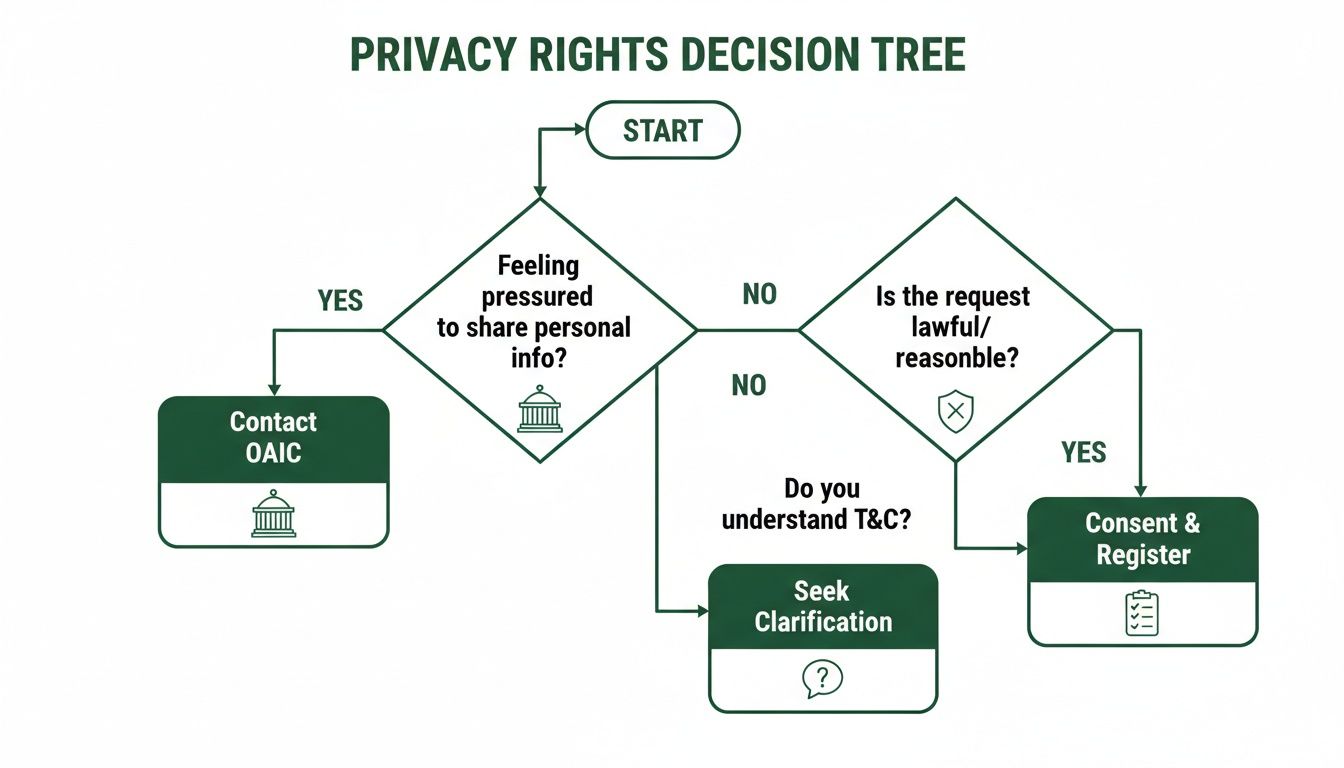
The key takeaway here is knowing you always have options, whether that’s simply declining to share your number or escalating any concerns you have to the OAIC. If you want to take things a step further and actively clean up your digital footprint, looking into advanced phone number scrubbing techniques can be a game-changer.
Being smart about your privacy is just as important as having the right tech. Before selling or trading in a device, it's vital to ensure all personal data is gone for good. Our guide on how to completely wipe an iPhone provides clear, step-by-step instructions.
When you're ready to upgrade, you can shop with confidence at Trade.com.au. We're a trusted Australian marketplace that puts quality tech and our customers' security first.
Got Questions? We've Got Answers
You've learned the methods, but a few common questions always pop up when people start hiding their phone numbers. Let's clear up some of the finer points.
If I Hide My Caller ID, Can I Still Be Traced?
Yes, absolutely. While hiding your Caller ID stops the average person from seeing your number, it doesn't make you a ghost.
Think of it this way: the feature is designed for everyday privacy, not for complete anonymity. Emergency services and law enforcement can always trace your number when there's a legitimate need. Your mobile carrier also keeps detailed logs of every call you make, regardless of your Caller ID settings.
Key takeaway: Hiding your number is for personal privacy, not for illegal activities. Authorised parties can still identify you.
Will Hiding My Number Stop Me From Calling Certain People?
It can. Many businesses and even some individuals use services that automatically reject calls from numbers that show up as "Private," "Unknown," or "No Caller ID."
It’s a common strategy they use to filter out spam and robocalls. So, if you try to call someone and the line is instantly busy or the call won't connect, this is the likely culprit. To get through, you'll need to temporarily unblock your number for that specific call.
Does Making My Number Private Also Hide It For Text Messages?
No, it doesn't. This is a crucial point that catches a lot of people out. The Caller ID settings we've walked through only apply to traditional voice calls.
When you send a standard SMS or MMS message, your phone number is always visible to the person you're texting. If you need to send messages without giving away your real number, you'll have to use a dedicated third-party app or a virtual number service. These tools give you a separate, anonymous line just for messaging.
At Trade.com.au, we believe in empowering you with both great technology and the knowledge to use it safely. When you're ready for an upgrade, explore our range of verified refurbished devices with confidence. Find your next phone, tablet, or laptop at https://www.trade.com.au.