

The Essential Guide to Choosing a Phone for Kids in Australia
Deciding on a phone for kids is one of those big modern parenting moments, isn't it? It’s a mix of excitement for their growing independence and, let's be honest, a good dose of nerves. This isn't just about handing over a new gadget; it’s their first real step into managing a tool for connection, safety, and responsibility. Think of this guide as a chat with a tech-savvy friend who’s been there, ready to help you make a smart, confident choice that feels right for your family.
Navigating Your Child's First Phone Milestone
Giving your child their first phone is a huge step. It’s totally normal to feel a bit of everything—pride that they’re growing up, and a healthy amount of concern about the digital world they’re about to jump into. You’re definitely not alone; thousands of Aussie parents are in the exact same boat every year.
Our goal here is to help you move past the "if" and get straight to the "how." We'll walk you through everything, from figuring out the 'right' age to finding that sweet spot between giving them freedom and keeping your peace of mind.
Why This Guide Is for You
This isn't just another tech review site. We’ve put this together as a practical roadmap just for Australian parents. We get the local concerns because we're part of the same community. We'll be covering the stuff that actually matters:
- Age-Appropriate Choices: What a 9-year-old needs is worlds away from what a 14-year-old is ready for. We’ll break it down.
- Safety First: We'll show you how to lock things down with parental controls and build a safe digital space from the get-go.
- Building Responsibility: This is about framing the phone as a tool that needs care, respect, and smarts to use properly.
- Budget-Friendly Options: You don't need to break the bank. We’ll explore clever ways to get a fantastic device for less.
The Smart and Sustainable Choice
Let's face it, one of the biggest hurdles is the cost. A brand-new smartphone can set you back a small fortune, which feels like a massive gamble for a first-time phone user who is, well, a kid! This is where certified refurbished phones from Trade.com.au really shine.
Think of a certified refurbished phone like a certified pre-owned car. It’s not just 'used'—it's been professionally inspected, tested, and restored to perfect working order, and it comes with a solid warranty.
This approach gives you the best of both worlds. You get a top-quality, reliable phone for way less than the price of a new one. It’s a practical, budget-friendly, and eco-friendly choice that more Aussie families are making every day.
To get a better idea of the kind of value you can get, have a look at some of the best budget phones in Australia. We're here to help you find the perfect phone for kids without the brand-new price tag.
Matching the Right Phone to Your Child's Age
Let's be clear: there’s no magic number for when a kid is ready for a phone. A child's maturity and how responsible they are matter far more than their exact age. So, instead of focusing on a specific birthday, it's much more helpful to think about their developmental stage and what they actually need a phone for.
This approach helps you match the device's features to your child's real-world needs, making their first steps into mobile tech much smoother and safer. We’ve broken it down into the three common stages most Australian families navigate.
Ages 6-9: The Starter Phone
For younger kids, a phone is all about safety and basic contact. It’s for calling you after school or sending a quick text to say they've arrived safely at a friend's place. At this age, a full-blown smartphone with open internet access is usually more of a distraction and a risk than a useful tool.
The focus here should be on two things: durability and simplicity. Think of this first device as a "communication tool," not an entertainment hub. A basic phone that can only call and text a pre-approved list of contacts is often the perfect fit.
- Primary Need: Basic communication and safety.
- Recommended Device: A tough, basic feature phone or a specialised kid-friendly device.
- Key Features: Long battery life, a limited contact list, no internet or app store access, and a rugged build that can survive a few drops.
Ages 10-13: The First Smartphone
This is often the age when social circles get bigger and kids start needing more than just calls. They might be walking to school on their own, coordinating group projects with friends, or starting to use educational apps. It's the right time to introduce a basic smartphone, but with strong guardrails in place from day one.
Choosing a phone for kids in this age bracket is all about prioritising robust parental controls. This is your chance to teach them about digital citizenship, app safety, and responsible online habits before they get more freedom. A certified refurbished phone is a fantastic choice here—it offers smartphone features without the premium price tag or the worry that comes with a brand-new device.
This stage is less about the phone itself and more about the habits you build together. Setting up parental controls, screen time limits, and content filters isn't about restriction; it's about creating a safe training ground for responsible digital habits.
Phone ownership is definitely on the rise for this age group. Recent data shows that 46% of Australian children aged 6 to 13 were using a mobile phone in 2020, up from 41% in 2015. You can discover more insights on Australian screen time statistics to get a better picture of the trends.
Ages 14+: The Responsible User
By the time they hit their teens, your child is probably using their phone for everything—school research, staying in touch with friends, hobbies, and maybe even a part-time job. The conversation naturally shifts from direct control to ongoing guidance and trust. They'll need a device with more capability, a decent camera, and enough power to handle their daily life.
At this point, you can comfortably transition them to a more powerful refurbished smartphone, like a slightly older iPhone or Samsung model. This gives them the features they want at a much friendlier price. The focus now turns to conversations about more complex topics, like:
- Digital Footprint: Chatting about how their online activity can stick around and affect them long-term.
- Data Management: Teaching them how to keep an eye on their mobile data plan.
- Social Media Etiquette: Reinforcing the ground rules about kindness, privacy, and what’s okay to share.
- Cyberbullying Awareness: Making sure they know how to spot and report harmful online behaviour.
To help you see it all at a glance, here’s a quick-reference table breaking down the key considerations for each age group.
Phone Features by Age Group
| Age Group | Primary Needs | Recommended Device Type | Key Features |
|---|---|---|---|
| 6-9 | Safety, emergencies, basic contact with family | Basic feature phone or kid-safe device | Limited contacts, no internet, long battery life, durable build |
| 10-13 | Social connection, school apps, responsibility | Basic or mid-range refurbished smartphone | Robust parental controls, GPS tracking, app store management, screen time limits |
| 14+ | School, social life, hobbies, independence | Mid-to-high-range refurbished smartphone | Good camera, reliable performance, sufficient storage, data plan |
By matching the phone's capabilities to their age and maturity, you're not just giving them a piece of tech. You're giving them a tool that grows with them, empowering them with the right features at the right time.
Essential Features Every Kid's Phone Should Have
When you're looking for a kid's first phone, it's easy to get sidetracked by flashy specs and the latest models. But here’s the thing: the best phone for a child isn't the one with the fastest processor. It’s the one with the right features to keep them safe, connected, and responsible.
Let's cut through the noise and talk about the practical, non-negotiable features you should be looking for. Think of these as the foundations for a positive first phone experience—they give you peace of mind and give your child the right amount of freedom without overwhelming them.
The Durability Factor
Let's be real for a second. That phone is going to be dropped. It’s going to get bumped around in a school bag and probably encounter a sticky situation or two. Durability isn't a nice-to-have; it's an absolute must. A flimsy phone is just a cracked screen waiting to happen.
This is why build quality should be right at the top of your checklist. Look for phones known for being tough. Many modern smartphones, including plenty of great refurbished models, come with toughened glass like Gorilla Glass, which offers serious protection from everyday tumbles and scratches.
On top of that, a bit of water resistance is a huge bonus. It won't make the phone ready for a swim, but an IP rating (like IP67 or IP68) means it can probably survive an accidental spill or getting caught in the rain. That one simple feature can be the difference between a close call and a dead phone.
Long-Lasting Battery Life
A phone with a dead battery is just a useless piece of glass. For a child, a reliable battery is their lifeline to you. It has to last them through a full school day, whatever sport they have on after, and the bus ride home.
When you're comparing models, don't just get fixated on the battery size (measured in mAh). The real proof is in the pudding. Jump online and check out reviews that test real-world usage. A phone that can genuinely last all day means they can always call you, and you can always check their location if you need to.
Think of the battery as the most fundamental safety feature. A phone that lasts all day provides a consistent and reliable connection, which is the primary reason most parents give their child a phone in the first place.
The 'Peace of Mind' Trio
Beyond the physical hardware, the most important features are the ones that help you guide and protect your child. These are the software tools that let you create a safe digital playground for them.
- Robust Parental Controls: This is your digital toolkit. Modern phones running iOS (Screen Time) and Android (Google Family Link) have powerful, built-in controls that are surprisingly easy to use. You can set time limits on apps, filter out inappropriate websites, and approve or block app downloads before they happen.
- Reliable Location Tracking (GPS): Knowing your child is where they're supposed to be brings incredible peace of mind. A phone with a reliable GPS lets you see they’ve made it to school or a friend’s house safely. This isn't about spying; it's about safety, especially as they start exploring the world more independently.
- Emergency SOS Functions: This is a big one. Most smartphones have a built-in emergency SOS feature—make sure you teach your child how to use it. It usually involves pressing a sequence of buttons to quickly call emergency services and send a text to pre-selected contacts with their current location.
Finally, while you don’t need a Hollywood-level camera, a decent one is more than just for selfies. It’s a tool for creativity, letting them capture memories on a school trip, share moments with their grandparents, and even help with school projects. It’s a feature that helps them connect with their world in a fun, positive way.
Your Step-by-Step Guide to Setting Up Parental Controls
So, you’ve handed over the new phone. The excitement is real, but what you do next is probably the most important part of this whole process. It’s time to set up the parental controls. This is your chance to build a safe, positive, and structured digital space for your child right from day one.
This isn’t about locking them out of everything; it’s about building digital guardrails. Think of it like the kids' section at the local library—content filters make sure they’re only seeing things that are right for their age. Let’s walk through how to get this done on both iPhones and Androids. It might seem daunting, but it's actually a straightforward and empowering process.
Setting Up Controls on an iPhone with Screen Time
Apple’s built-in tool, Screen Time, is a fantastic and surprisingly easy-to-use way to manage your child’s device. You can set it up right on their phone, or if you use Family Sharing, you can manage everything remotely from your own iPhone.
-
Turn On Screen Time: Grab their phone, head to Settings > Screen Time and tap "Turn On Screen Time." It will ask if the device is for you or your child—make sure to select "This is My Child's iPhone."
-
Set Downtime and App Limits:
- Downtime: This is a brilliant feature for scheduling screen-free time, like during dinner or an hour before bed. Only the apps you specifically allow (like Phone and Messages) and calls will work.
- App Limits: You can put daily time limits on whole categories of apps (like "Games" or "Social") or even on specific apps. It’s a great way to start teaching them about digital balance.
-
Manage Content & Privacy: This is where you get into the nitty-gritty. In Content & Privacy Restrictions, you can:
- Prevent Purchases: Go to "iTunes & App Store Purchases" to block those sneaky in-app purchases and make sure a password is required for all new downloads.
- Filter Web Content: Under "Content Restrictions," find "Web Content" and choose "Limit Adult Websites." This automatically filters out a huge amount of explicit material. For younger kids, you can even create a whitelist of approved websites.
- Control Privacy: This lets you decide which apps can access their location, contacts, photos, and microphone. You can manage this on an app-by-app basis.
Managing an Android Phone with Google Family Link
If you’re in the Android world, Google Family Link is your best friend. It’s a free app that you’ll need to install on both your phone and your child’s to get them connected.
-
Install and Connect: First, download the Google Family Link app on both phones. The app will walk you through the steps to link your child’s Google Account to your parent account.
-
Set Daily Limits and Bedtime: From the Family Link app on your own phone, you can easily set a total daily screen time limit. There’s also a "Bedtime" feature that locks their phone during the hours you choose, making sure they actually disconnect at night.
-
Control Apps and Content:
- App Management: You get a clear view of how much time they spend in each app. You can block any apps you don’t approve of and set time limits on others.
- Purchase Approvals: Tweak the settings so that you have to approve any app they try to download or buy from the Google Play Store. No more surprise credit card bills!
- Location Tracking: Family Link has a very handy location feature that shows you where your child's phone is on a map. It adds a welcome layer of peace of mind.
This infographic breaks down the essential features to consider for any kid's phone, from its build to its safety settings.
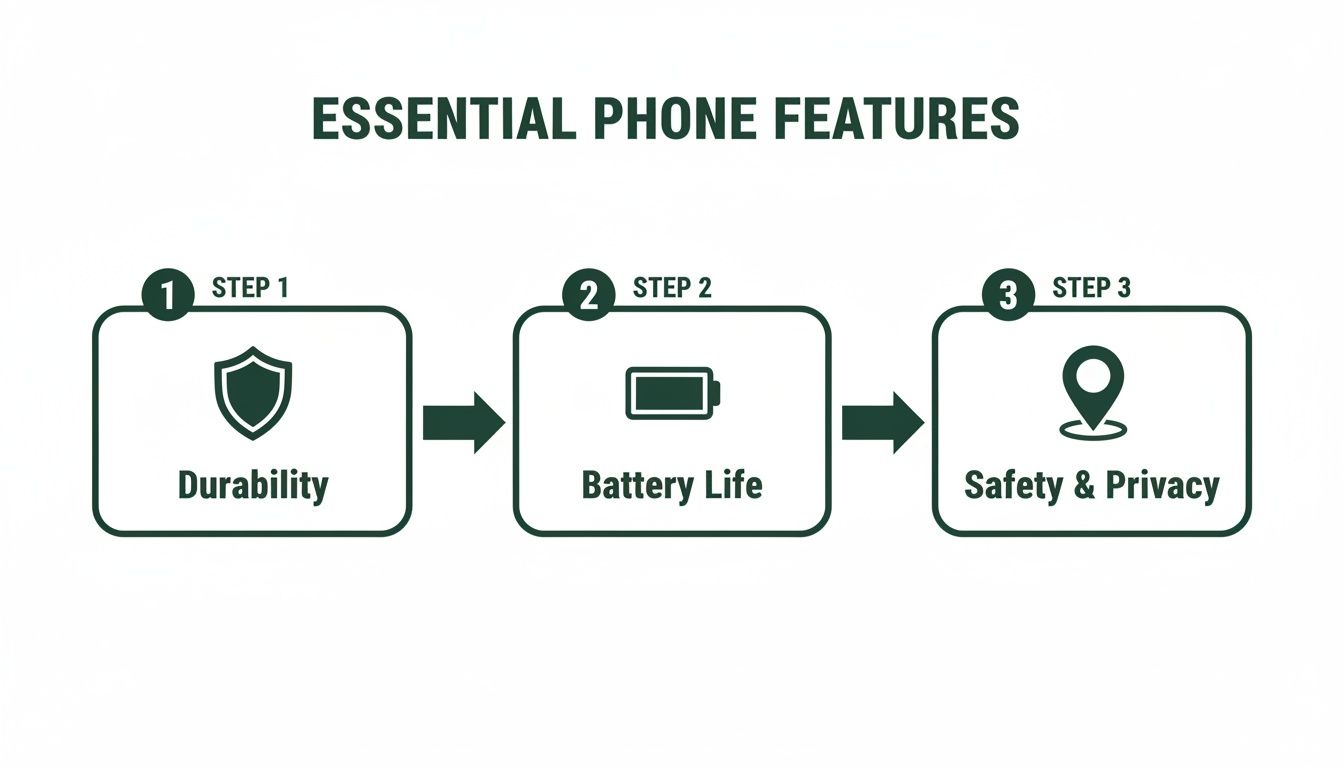 It’s a great reminder that a phone for a child is about more than just fun apps. It’s a balance of tough hardware and smart, protective software.
Key Settings to Always Enable
Whether you’ve gone with an iPhone or an Android, a few settings are simply non-negotiable for a child's first phone. As kids get older, phone ownership skyrockets. In fact, over 95% of Australian teens aged 17 have one, with parental restrictions being the main reason younger kids don't.
Setting up the phone is a perfect opportunity to teach digital literacy. Don't just do it in secret. Walk your child through the settings you've chosen and explain why they’re important. This approach helps them understand the rules and feel like they're part of the process.
And while your child might be past the toddler years, it can still be helpful to understand the general expert advice on digital exposure by looking at resources like screen time guidance for babies and toddlers.
Finally, if you ever need to start fresh or get the phone ready for a new user down the road, it’s always useful to know how to factory reset an Android phone. Taking these steps helps turn what could be an overwhelming device into a much safer, more constructive tool for their journey into the digital world.
Why Refurbished Is the Smart Choice for Your Family
So, you're getting a phone for your child. One of the first decisions you'll face is whether to buy a shiny new device or a refurbished one. While that brand-new box is tempting, certified refurbished phones are a genuine game-changer for parents, offering a smarter, safer, and more sustainable path. Let's walk through why it’s probably the best move for your family's budget and your peace of mind.
The most immediate win? The cost. Let's be honest, kids and phones can be a chaotic combination. Drops, spills, and the occasional mysterious disappearance are all part of the territory. Paying top dollar for a brand-new device that’s heading into this daily battlefield can feel like a massive gamble.
A refurbished phone gives you a high-quality, fully working device for a fraction of the price. This means you can often afford a better, more durable model without the eye-watering price tag, which makes those inevitable "oops" moments far less stressful.
More Than Just a Second-Hand Phone
It’s so important to get this next point: ‘certified refurbished’ is not the same as ‘used’. A used phone from a private seller on Facebook Marketplace comes with zero guarantees. You’re rolling the dice. A certified refurbished phone, on the other hand, is like a certified pre-owned car—it’s been through a tough, professional process to make sure it works like new.
Here at Trade.com.au, every single device goes through meticulous testing by our expert technicians. We check everything: the battery health, the screen, the cameras, and all the internal bits and pieces. Any part that doesn't meet our high standards gets properly repaired or replaced, and then the whole device is professionally cleaned.
This professional certification process is your assurance of quality. It means you're getting a device that performs just like a new one and is backed by a solid 12-month warranty, giving you complete confidence in your purchase.
This process ensures you get a reliable phone that won't let you or your child down. For a deeper dive into the specifics, you can learn more about what a refurbished phone is and why it's such a trustworthy choice.
A Greener Choice for Australia
Choosing refurbished tech is also a powerful vote for sustainability. Australia generates a staggering amount of electronic waste, and picking a refurbished phone actively helps reduce this problem. By giving a perfectly good device a second life, you're conserving the resources needed to build a new one and preventing another phone from ending up in a landfill.
Teaching your child that their phone is part of a "circular economy" is a fantastic lesson in environmental responsibility. It’s a real, tangible way to show them that making smart, sustainable choices matters.
To make things even clearer, here's a quick comparison of what you get when buying new versus choosing a certified refurbished phone from us.
New vs Refurbished Phone Comparison
| Feature | Brand New Phone | Certified Refurbished (Trade.com.au) |
|---|---|---|
| Cost | Premium retail price | Significant savings (often 30-50% less) |
| Condition | Perfect cosmetic and functional condition | Excellent functional condition, may have minor cosmetic signs of use |
| Testing & Certification | Standard factory quality control | Comprehensive multi-point inspection, testing, and professional repair |
| Warranty | Standard manufacturer's warranty | Includes a 12-month warranty for peace of mind |
| Environmental Impact | High carbon footprint from manufacturing | Low environmental impact by extending a device's lifespan |
Ultimately, choosing a refurbished phone for your child is a practical, economical, and eco-conscious decision that benefits the whole family. You save money, reduce stress, and make a better choice for the planet.
Why Trust Trade.com.au for Your Kid's Phone?
Giving your child their first phone is a massive milestone, and let's be honest, it can feel a bit daunting. Where you buy that phone from matters—a lot. It’s not just about the device; it’s about having peace of mind. At Trade.com.au, we get it. We’re not some faceless online store; we’re a dedicated Aussie team right here to make your family’s jump into tech safer, easier, and more affordable.
One of the biggest worries for any parent is the classic "what if it breaks?" scenario. It's a fair question, especially with a refurbished device. That’s exactly why we stand behind every single phone we sell, no exceptions.
We back all our devices with a comprehensive 12-month warranty. This isn't just a marketing line; it’s our promise to you. It means you’re getting a quality phone that’s been properly tested and is built to handle daily life.
Buying with us means you can breathe a little easier, knowing you’re protected well after you've unboxed it. This takes the guesswork out of choosing a phone for kids, so you can focus on the important stuff, like teaching them how to use it responsibly.
Making It Affordable with Easy Trade-Ins
Let’s talk about the budget. A new phone can be a huge expense, especially when you know it might get dropped, misplaced, or outgrown. Our trade-in program was designed with families like yours in mind, helping you unlock the hidden value in your old tech.
Got old phones, tablets, or laptops gathering dust in a drawer? Don't let them sit there. Trading them in with us is straightforward, and the value you get can be put directly towards the cost of your child's new phone. It’s a smart, practical way to make this big step much more budget-friendly.
Local Australian Support You Can Count On
When something goes wrong or you just have a quick question, the last thing you want is to be stuck on hold with an overseas call centre. We’re a proud Australian company, and our support team is right here with you.
That means real help from real people is just a quick call or email away. No confusing jargon or endless waiting times—just friendly, clear advice from tech experts who are part of your community. Whether you need a hand picking the right model or getting it set up, we're here. Our goal is to make tech simple, safe, and sustainable for Aussie families.
A Few Final Questions You Might Have
Even with all the planning in the world, getting your child their first phone is a big step, and it's totally normal to have a few last-minute questions. Think of it as the final check before take-off. Let's run through some of the most common ones we hear from parents.
What’s the Best Mobile Plan for a Child?
The absolute last thing you want is a surprise phone bill that looks more like a car payment. For a kid's first phone, the smartest and safest choice is almost always a low-data, prepaid option.
Prepaid plans are fantastic because you pay for everything upfront—a set amount of calls, texts, and data. Once that data is used up, it’s gone. No eye-watering excess charges, no bill shock. It’s also a brilliant, low-stakes way to teach them about managing a budget and understanding that data isn't an infinite resource. You can easily start with a tiny 1GB or 2GB plan and see how they go.
How Do I Set Up a Family Phone Contract?
Don't let the word "contract" scare you. This isn't about legal documents and fine print; it's about sitting down together and agreeing on the rules of the road. A family phone contract is an amazing tool for making sure everyone is on the same page.
Think of it as a shared agreement, not a list of demands. Writing it down together turns abstract rules into a concrete promise. When kids help create the rules, they're far more likely to respect them.
Your agreement could cover things like:
- Device-Free Zones: No phones at the dinner table or in bedrooms after 9 PM. Simple.
- The Kindness Rule: A promise to only text, post, and share things that are kind and respectful.
- Safety Check-ins: An understanding that parents can check the phone to ensure they're staying safe online.
For families navigating co-parenting, dedicated tools like co-parenting communication apps can be a huge help in keeping rules and schedules consistent across households.
What if the Phone Gets Lost or Broken?
Let’s be realistic: accidents are part of life, especially with kids. The trick is to have a plan before it happens. The very first thing you should do is switch on "Find My" (for iPhones) or "Find My Device" (for Android). This lets you see the phone's location on a map or, in a worst-case scenario, wipe it remotely to protect their data.
This is also where buying a quality refurbished phone really shines. It takes so much of the financial sting out of a replacement. Plus, the 12-month warranty from Trade.com.au adds another layer of security, covering you for any hardware faults and giving you one less thing to worry about.
Ready to find a safe, affordable, and reliable first phone for your child? The team at Trade.com.au has a huge range of certified refurbished devices, all backed by a local warranty and a team you can trust.