

A Guide to Your AMTA IMEI Check in Australia
Spotted a killer deal on a second-hand phone in Australia? Before you even think about handing over the cash, there’s one crucial step you can't skip: a quick AMTA IMEI check. Think of it like a background check for a mobile phone. This free tool from the Australian Mobile Telecommunications Association is your best friend, instantly telling you if a phone has been reported lost, stolen, or blocked from Aussie networks. It's the simple step that saves you from the headache of buying an expensive paperweight.
Why an IMEI Check Is a Must-Do Before Buying a Used Phone
A phone's IMEI (International Mobile Equipment Identity) is its unique digital fingerprint. It’s a 15-digit number that’s one-of-a-kind to every single device. When a phone is reported lost or stolen in Australia, the carriers add its IMEI to a national blacklist.
A blacklisted phone is basically useless here. It won’t connect to any Australian mobile network—not Telstra, Optus, Vodafone, or any of their smaller partners. That means no calls, no texts, and no mobile data. The only way to know for sure if a device is clean is to run its IMEI through the AMTA database.
The Real-World Risks of Skipping the Check
Let's paint a picture. You find a great price on a nearly-new iPhone on a marketplace. You meet the seller, the phone looks pristine, and you go through with the purchase. But when you pop your SIM card in, you’re hit with the dreaded "No Service" message. You've just discovered the hard way that the phone was reported stolen and is now permanently blocked.
This exact scenario happens more often than you’d think. Without an IMEI check, you’re flying blind and just taking the seller's word for it. This simple, free check is your first and best line of defence against scams and a non-negotiable step for any savvy buyer in Australia.
It's Not Always About Lost or Stolen Phones
A blocked IMEI doesn't always point to theft. With recent network upgrades, some older 4G phones, particularly models bought overseas, are being blocked because they can't make emergency Triple Zero (000) calls on modern VoLTE networks.
So, a phone could work perfectly fine in another country but be a complete dud here in Australia. Beyond the network status, it's also smart to look into other aspects of a phone's history, like tracking device warranties, to get the full picture. These checks give you the peace of mind you need, ensuring your new-to-you phone is ready to go.
How to Find and Check Any Phone's IMEI
Before you can run the check, you need the phone's unique 15-digit IMEI number. Don't worry, you don't need to be a tech wizard to find it; it's surprisingly straightforward.
Three Simple Methods to Find a Phone's IMEI
Instantly locate the unique 15-digit IMEI number on any mobile device using these foolproof techniques.
| Method | Instructions | Best For |
|---|---|---|
| The Dialler Code | Open the phone app and dial *#06#. The IMEI will immediately pop up on the screen. | The quickest and easiest method that works on almost any phone, iPhone or Android. |
| Check the Settings |
iPhone: Navigate to Settings > General > About and scroll down to find the IMEI. Android: Go to Settings > About Phone > Status (or a similar path). |
When you want to double-check the number or if the dialler code doesn't work for some reason. |
| Physical Inspection | Look for the IMEI printed on the SIM card tray or, on older models, on the back of the phone itself. | Essential for phones that won't turn on or if you need to verify the number without powering up the device. |
If you're specifically looking for the IMEI on an Apple device, our guide on how to find your iPhone's IMEI number offers a more detailed walkthrough.
Running the AMTA Check: The Moment of Truth
Got the 15-digit IMEI? Great, the next part takes less than a minute.
The go-to resource in Australia is the Australian Mobile Telecommunications Association (AMTA). Their free ‘Mind Your Mobile’ tool is the official database for checking if a phone is blacklisted on Australian networks.
Just head to the AMTA website, pop the IMEI into their checker tool, and you'll get an instant result.
As you can see from the image above, the website is clean and simple. You just type the IMEI into the field and hit go.
After you complete the quick security check, the site will tell you whether the phone is clean or if it has been reported as lost, stolen, or blocked. This is your defence against buying a dud.
Pro Tip: Never trust a screenshot of the results from a seller. It could be faked or old. Always run the check yourself, right before you hand over any money, to get the most up-to-date status of the device.
This simple check empowers you to make a smart purchase, verifying that the phone you're about to buy is legitimate and won't be blocked from connecting to a network. Now, let's look at what those results—like 'Clean' or 'Blocked'—really mean for you.
Understanding Your AMTA Check Results
Alright, so you've done the smart thing and run an AMTA IMEI check. Now you're staring at the result on your screen, but what does it actually mean? This is the most critical part of the process, and getting it right can save you a world of headaches.
Think of it like a car history report before buying a used vehicle. A clean report means you're good to go, but a flagged one warns you about hidden issues that could turn your dream purchase into a nightmare. The IMEI check does the same job for a used phone.
What Each Status Means for You
The results from an AMTA check are pretty straightforward, but each one signals a very different path forward.
| Status | What It Means | Your Next Step |
|---|---|---|
| Clean | This is the green light! The device has not been reported lost, stolen, or blocked on any Australian mobile network. | Proceed with confidence, but remember to check if the phone is carrier-unlocked. |
| Barred / Blocked | This is a major red flag. The device is on the national blacklist and will not work with any Australian carrier. | Do not buy the phone. Walk away from the deal immediately. |
Ultimately, a Clean status is what you're hoping for. It means the phone should have no trouble connecting to carriers like Telstra, Optus, or Vodafone.
However, a clean bill of health on the blacklist doesn't guarantee the phone is unlocked from its original network. It's a separate issue, so it's always a good idea to find out how to check if an iPhone is unlocked to make sure it will work with any SIM you throw in it.
The Big Red Flag: Barred or Blocked
If your AMTA IMEI check comes back as “Barred” or “Blocked,” stop everything. Seriously. This is a deal-breaker, and you should not, under any circumstances, buy the phone. A device with this status has its IMEI on the national blacklist, rendering it useless in Australia. This is exactly why grabbing the IMEI is so important before you hand over any cash.
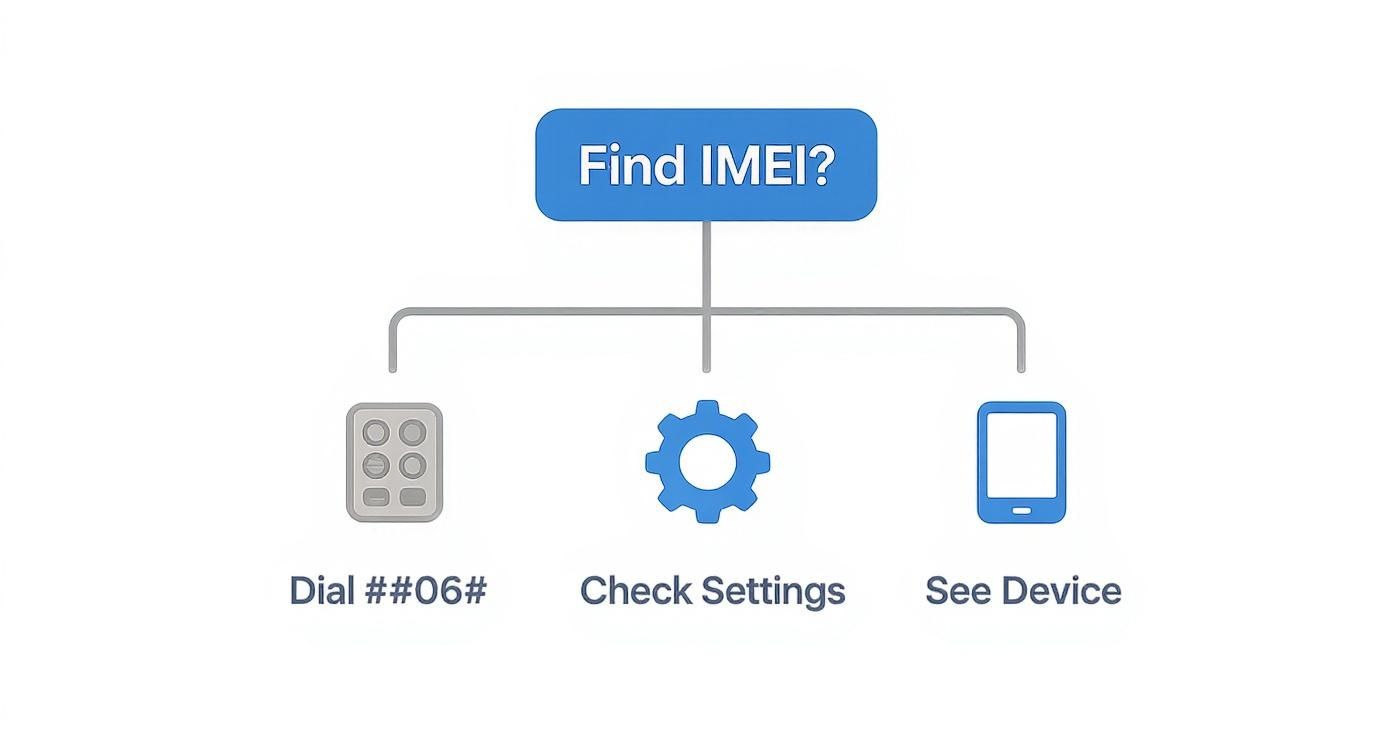
As you can see, finding the IMEI is simple. It's the key to avoiding a phone that's little more than a paperweight. A blocked device can't make calls, send texts, or use mobile data. It's effectively bricked.
So, how does a phone end up on this list? The reasons are never good news for a potential buyer:
- It’s been reported lost or stolen: This is the most common reason. The original owner has reported the device missing, and their carrier has blacklisted it.
- There’s money owing on it: The phone could still be under a contract that the original owner has stopped paying.
- It’s a non-compliant grey import: A growing issue in Australia, some phones bought overseas are blocked because they don't support emergency Triple Zero (000) calls on our 4G/5G networks, which is a legal requirement.
No matter the reason, a blocked result means only one thing: walk away. It’s the only safe move.
Australian Network Rules and Device Blocking
While an AMTA IMEI check is fantastic for catching lost or stolen phones, there’s another layer to the story here in Australia that many buyers miss. A phone can have a perfectly clean history but still get blocked from local networks for a totally different reason: network compliance.
This is a uniquely Australian problem that often catches people by surprise, especially when buying phones from overseas or even some older 4G models sold right here. It all boils down to a critical government mandate designed to keep us safe.
The Triple Zero Emergency Call Requirement
Australian law is strict: every mobile device connecting to our networks must be able to make an emergency Triple Zero (000) call over modern 4G and 5G. This capability is often referred to as VoLTE (Voice over LTE) for emergency services.
Now that Australia’s major carriers like Telstra and Optus have shut down their old 3G networks, this rule is being heavily enforced. If a phone doesn't have the specific hardware and software to meet this standard, it gets blocked. It's not because it's stolen, but simply because it’s deemed non-compliant.
This is why a perfectly good phone bought online from an international seller might refuse to connect when you get it to Australia. It just wasn't built to meet our country's specific emergency service regulations.
How Australian Carriers Enforce These Rules
Carriers like Telstra, Optus, and Vodafone are responsible for ensuring every device on their network is compliant. They use a device's IMEI to identify and block incompatible models from connecting.
This can be a huge point of confusion. A seller might honestly believe their phone works fine, not realising it's on a national blocklist for regulatory reasons. This makes running your own AMTA IMEI check before you buy even more essential. To help Aussies navigate this, AMTA has expanded its IMEI checker to verify 4G network compatibility, and you can learn more about the government's 3G switch-off initiative and how it affects different devices.
Common Scenarios Where Phones Get Blocked
Once you understand these rules, you can start to spot potential risks when shopping for a used phone. Keep a sharp eye out for these situations:
- Grey Imports: These are phones sold in Australia by unofficial retailers that were originally meant for other markets (like the US or Asia). They often lack the specific software needed for Australian VoLTE.
- Older 4G Models: Some early 4G phones, even if sold locally years ago, weren't built with the tech needed for VoLTE emergency calls. They're now being phased out.
- "Unlocked" International Phones: Just because a phone is "unlocked" doesn't mean it will work here. That term only means it isn't tied to a specific carrier. It does not guarantee it complies with Australian network regulations.
This local knowledge is crucial. It proves an IMEI check isn't just about dodging stolen goods; it’s about making sure a device is fundamentally compatible with how our mobile networks operate today.
Shop with Confidence at Trade.com.au
Let's be honest: navigating the second-hand phone market can feel like a gamble. Between anonymous sellers on marketplaces and the ever-present risk of scams, it’s easy to feel like you're rolling the dice.
That’s exactly why choosing a trusted, verified marketplace like Trade.com.au makes all the difference. We built our entire business around turning that uncertainty into confidence. When you shop with us, you’re not just buying a phone; you’re buying complete peace of mind.
Our Ironclad Verification Process
For every single device that arrives at our facility, an AMTA IMEI check is the very first thing we do. It’s a non-negotiable part of our process. If a device flags anything other than a clean IMEI, it doesn’t even make it through the door. Simple as that.
But that’s just where our checks begin. Our expert technicians then get to work, putting each phone through a rigorous, multi-point inspection to make sure it meets our high standards for quality and performance.
This comprehensive check-up covers everything you'd worry about:
- Battery Health: We test the battery to ensure it holds a proper charge. No one wants a phone that dies by lunchtime.
- Screen Condition: Every screen is meticulously inspected for scratches, dead pixels, and touch responsiveness.
- Full Functionality: We test all the bits and pieces—cameras, buttons, charging ports, speakers, and microphones—to confirm everything works perfectly.
- Network Compatibility: We verify that the device is fully unlocked and ready to go with all Australian network providers.
We handle all the technical checks and verifications so you don't have to. Every single device we list for sale has already passed these crucial tests, letting you focus on choosing the right model, not stressing about its history.
More Than Just a Check—It's Our Promise
Our commitment to you doesn’t stop once the inspection is done. Every refurbished device sold on Trade.com.au is backed by our comprehensive warranty. This isn't just a vague promise; it's our guarantee that your device will perform as expected.
In the rare event that something does go wrong, you’re not left to fend for yourself. Our local Australian support team is right here to help, providing a safety net you simply won’t find when buying from a stranger online. This warranty is your protection against the risks of ending up with a faulty, blocked, or even stolen phone.
When you choose Trade.com.au, you’re choosing a secure, transparent, and genuinely Aussie way to buy refurbished tech.
Got Questions About IMEI Checks? We’ve Got Answers.
Even after you’ve got the process down, a few questions usually pop up. To make sure you’re feeling 100% confident, we've gathered the most common queries we hear from Aussies buying second-hand tech.
Can a Blocked IMEI Ever Be Unblocked in Australia?
This is a big one, and the answer is a cautious "yes, but...". An IMEI block can only be lifted by the same person who originally reported the device as lost or stolen. To do this, they have to contact their mobile carrier and prove their identity.
If you’ve accidentally bought a phone that’s already blocked, there is nothing you can do to unblock it yourself. That’s why checking the IMEI before you hand over any money is non-negotiable.
Does an AMTA IMEI Check Work for Overseas Phones?
The AMTA check is tailor-made for Australia. Its job is to tell you if a device has been blocked on Australian networks. It won’t tell you if a phone has been blacklisted by an international carrier in, say, the UK or the US.
But, and this is important, running an AMTA check on an imported phone is still a crucial step. Many phones bought from overseas get blocked right after they arrive here, not because they're stolen, but because they don't meet our country's strict emergency call requirements. An AMTA check is the only reliable way to confirm an imported phone is cleared for use on Aussie networks.
Is the AMTA Check Free and Reliable?
Absolutely. The AMTA's 'Mind Your Mobile' IMEI check is 100% free for anyone to use.
It’s also the most trustworthy source you’ll find. The tool pulls its data directly from the national database shared by Telstra, Optus, Vodafone, and other Aussie carriers. This is the industry-standard tool, making it your best line of defence against buying a dud.
What if a Seller Refuses to Provide the IMEI?
This is the biggest red flag you can possibly get. A seller with nothing to hide will have no issue giving you the IMEI so you can do your due diligence.
If they refuse, give you the runaround, or pressure you to buy without checking, just walk away. It’s that simple. This kind of behaviour is a near-certain sign they know the device has a serious problem—it’s likely stolen, still has finance owing on it, or is already blocked. Do not buy the phone. A little patience here will save you a massive headache and a lot of money.
At Trade.com.au, we take all this guesswork off your plate. Every single device we sell has already passed a mandatory IMEI check and a detailed inspection, and it’s all backed by our warranty. Explore our range of verified refurbished devices today and shop with the peace of mind you deserve.