

Samsung Trade-In Australia: Your Ultimate Guide to Getting the Best Value
Thinking about upgrading your Samsung phone? It's a smart move. Instead of letting a perfectly good device gather dust in a drawer, you can trade it in to get a handy discount on a new model or simply get cash in your pocket. It’s a win for your wallet and an even bigger win for the planet, keeping e-waste out of Aussie landfills.
Your Complete Guide to Samsung Trade-In Australia
When it comes to a Samsung trade-in in Australia, you have two main paths. You can go directly through the official Samsung trade-in program, which is great if you’re buying a new device straight from them. Alternatively, you can use an independent marketplace like Trade.com.au, which often gives you more flexibility and a straight cash offer.
Navigating the rules and figuring out what your device is worth can feel a bit confusing at first, but don't worry. This guide will break it all down, helping you figure out which option gets you the best possible value for your old phone.
Why Trading In Your Samsung Just Makes Sense
For most Aussies looking to upgrade, trading in an old phone is a no-brainer. Here’s why it’s become such a popular choice:
- It Saves You Money: This is the big one. The value of your old phone gets knocked directly off the price of a new one, making that latest Samsung Galaxy model much more affordable.
- It’s Good for the Planet: E-waste is a massive problem in Australia. When you trade in your device, you ensure it either gets a second life with a new owner or is recycled responsibly by professionals.
- It’s So Much Easier: Forget the hassle of selling privately. No more dealing with endless low-ball offers, time-wasters on Facebook Marketplace, or awkward meetups. Trade-in programs are secure, simple, and straightforward.
Comparing Your Samsung Trade-In Options in Australia
So, should you go with Samsung's official program or a marketplace? It really depends on what you're looking for. Here’s a quick comparison to help you decide.
| Feature | Official Samsung Program | Marketplace (e.g., Trade.com.au) |
|---|---|---|
| Payout Type | Credit towards a new Samsung device | Cash payment or store credit |
| Convenience | Integrated into the new phone purchase | Simple online process, ship your device |
| Flexibility | Locked into buying from Samsung | Freedom to use the cash anywhere |
| Accepted Devices | Limited to specific models and conditions | Wider range of models accepted, even some damaged ones |
| Value | Often includes promotional bonus credits | Competitive cash offers based on market demand |
While the official program is seamless if you're already buying direct, a marketplace often gives you more freedom. Getting cash means you can shop around for the best deal on your next phone or just use the money for something else entirely.
In the sections ahead, we’ll dive deeper into how your phone's value is calculated and give you a step-by-step walkthrough of the process. For a wider look at your options, check out our guide on how to trade-in a phone in Australia.
And once you’ve made the upgrade, don’t forget to protect your new investment. Grabbing one of a variety of Samsung phone cases is the first thing you should do to keep it looking pristine.
What’s My Samsung Trade-In Worth? Here’s How It’s Calculated
Ever wondered why your friend got a killer trade-in deal for their old Samsung, but your quote felt a bit… underwhelming? It’s not just luck. There’s a clear method that determines the final value, and it all comes down to a few key factors.
First and foremost, the model and its age are the biggest drivers of value. It’s no surprise that a recent powerhouse like a Galaxy S24 Ultra will fetch a much higher price than a three-year-old Galaxy A series phone. It's simple supply and demand—newer models with the latest tech are in high demand for refurbishment.
Your phone's storage capacity also makes a real difference. A 512GB model will always be valued higher than a 128GB version from the same year, simply because it offers more to the next owner.
Condition Is Everything
Beyond the specs on the box, the actual physical and working condition of your phone is the most critical piece of the puzzle. When your device is assessed, it’s put under a microscope, and what you might consider a "minor scuff" could be graded differently by a professional.
Here's what the technicians are looking for:
- The Screen: Is it pristine, or does it have hairline scratches? Any deep scratches, chips, or a cracked screen will cause the biggest drop in value. Problems like screen burn-in or dead pixels also knock the price down significantly.
- Body and Frame: This is all about the scratches, dents, and chips on the casing. A phone in "as new" or "mint" condition looks like it just came out of the box, whereas one with noticeable dings on the edges will be graded as "good" or even "fair."
- Full Functionality: Every single button, port, speaker, and camera needs to work perfectly. If you’ve got a sticky volume button or the charging port is a bit fussy, expect a lower offer.
- Battery Health: For a top-tier valuation, the battery needs to hold a solid charge, which usually means it's at 80% or more of its original capacity. A tired battery means the device needs a replacement part, and that cost gets factored into your quote.
Pro Tip: A little honesty goes a long way here. If you know there's a tiny, almost invisible crack in the corner of the screen, it's best to declare it upfront. This helps you avoid the disappointment of getting a great initial quote, only to have it reduced after the professional inspection.
Market Forces and Good Timing
The tech world moves fast, and timing your trade-in can make a surprising difference. When Samsung launches a new Galaxy, the market gets flooded with older models as everyone rushes to upgrade. This surge in supply can cause trade-in values to dip temporarily.
New features can also accelerate this. Take the recent boom in on-device AI in smartphones, for instance. Here in Australia, these powerful new capabilities are driving a huge wave of trade-ins as people look to get their hands on the latest tech.
You can actually read more about mobile trade-in trends to see how these market shifts play out. By understanding what goes into the calculation, you can set realistic expectations and feel confident you’re getting a fair price for your old Samsung.
Preparing Your Samsung for a Flawless Trade-In
Before you say goodbye to your old Samsung and send it off on its next adventure, a little prep work is essential. Taking a few minutes to get it ready not only protects your personal data but also makes sure the trade-in process is seamless, without any last-minute surprises or valuation changes.
Think of it like a pre-flight checklist for your phone. It's simple, quick, and absolutely crucial.
The first and most important job is backing up all your precious data. You really don't want to lose years of photos, contacts, and messages. Thankfully, Samsung makes it incredibly easy to keep everything safe.
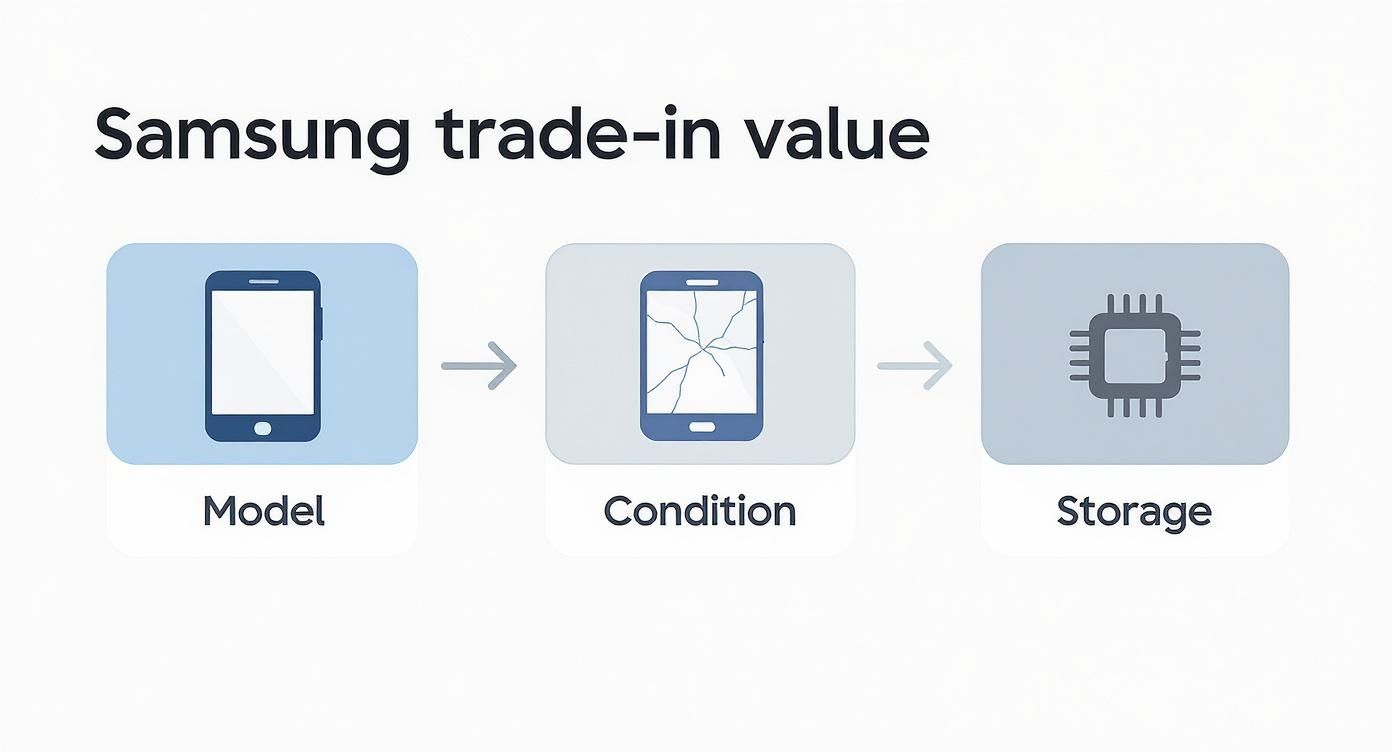
As you can see, your phone’s value comes down to its model, condition, and storage size. Getting a high-storage model into great condition is the key to getting the best possible price.
Secure Your Data First
Your phone is a vault of personal information, so creating a secure backup isn’t just a good idea—it’s a must-do. The good news is that it’s surprisingly quick.
You’ve got a few solid options for backing up your Samsung:
- Samsung Cloud: This is the most seamless option for Galaxy users. It saves your settings, call logs, messages, and even app data, making it a breeze to restore everything to your new Samsung device.
- Google Drive/Google Photos: An excellent all-rounder, especially for your photos and videos. Google Photos gives you plenty of storage and works flawlessly on any device you might switch to down the track.
- Computer Transfer: The classic method still works a treat. Just plug your phone into your PC or Mac with a USB cable and drag your important files across to a folder for safekeeping.
Wiping Your Device Clean
Once you're 100% sure your data is safely stored somewhere else, it's time to get the phone ready for its new owner. This part involves two critical steps to protect your accounts and your privacy.
First up, sign out of all your accounts. This is crucial for disabling security features like Factory Reset Protection. If you forget this, it could make the phone unusable for the next person and get your trade-in rejected.
Make sure you’ve removed:
- Your Samsung Account
- Your Google Account
- Any other accounts logged in, like social media or banking apps.
After you've signed out of everything, the final step is performing a factory data reset. This permanently erases every bit of personal data from the device, taking it back to its original, out-of-the-box state. You’ll find this option in your phone’s settings, usually under ‘General Management’ and then ‘Reset’.
Important: Performing a factory reset is the digital equivalent of shredding sensitive documents. It’s the best way to ensure none of your private information falls into the wrong hands. For a deeper dive, our guide on how to protect personal data before selling an old phone has you covered.
Finally, give your phone a quick physical clean. A simple wipe-down with a microfibre cloth to get rid of fingerprints and dust makes a great first impression. It shows you've taken care of the device, which always reflects well during the final inspection.
Navigating the Official Samsung Online Trade-In Program
Going directly through Samsung is a popular choice for many Aussies, especially when you’re already set on buying your new device from their official online store. It’s designed to be a smooth part of the purchase process, but it helps to know exactly how it works to avoid any surprises.
The process starts on Samsung’s website. As you’re selecting a new device, you'll see the option to trade in an old one. This is where you’ll enter your current phone's details and answer a few simple questions about its condition.
Be honest here—does the screen turn on properly? Are there any cracks on the front or back? Your answers generate an instant, estimated trade-in value on the spot.
The Instant Discount and the Security Charge
This is where the Samsung trade-in program stands out. The estimated value you receive isn't paid out later; it’s applied as an instant discount on your new purchase, which is fantastic for lowering the upfront cost.
But there's a crucial detail to understand: the security charge. Because Samsung gives you the discount before they’ve even seen your old phone, they place a temporary hold on your credit or debit card for the same amount. For example, if your trade-in is valued at $400, a $400 hold is placed on your card.
Analogy: Think of the security charge like a hotel's security deposit. It’s not an actual charge, just a temporary freeze on funds. Once your old device arrives and passes inspection—confirming its condition matches your description—the hold is released.
Completing the Process
After you’ve placed your order, Samsung will send you instructions and a prepaid shipping label to send your old device to their partner. You’ll typically have a specific timeframe, usually around 14 days, to get it in the mail.
The whole system is built to be convenient. Samsung’s official trade-in terms and conditions for Australia confirm that the determined value acts as an immediate price reduction, with the security charge held until your old phone is verified.
So, what happens if the inspection team decides your phone isn’t in the condition you stated? If the actual value is lower, Samsung will adjust the trade-in credit, and you’ll be charged the difference from that security hold. It’s a straightforward system where an accurate self-assessment is the key to a smooth experience.
Exploring Alternatives to Maximise Your Return
While Samsung’s official program offers a tidy, integrated experience, it's not the only game in town. If your main goal is getting the highest possible return for your old device, it’s smart to look at other options for a Samsung trade-in in Australia.
This is where dedicated tech marketplaces and trade-in platforms like Trade.com.au really shine. They operate differently, often leading to a much better deal in your pocket.
The biggest advantage is the payout itself. Instead of receiving credit that's locked into a new Samsung purchase, these platforms typically offer a direct cash payment. This freedom is a complete game-changer. You can use that money for anything—buy a different brand, find a better deal on a refurbished phone, or just keep the cash.
The Power of a Competitive Marketplace
On a platform like Trade.com.au, you aren't just dealing with one set price. You're tapping into a network of verified, professional buyers who are actively competing for good quality devices.
This competition naturally drives up the offer for your phone, especially if it’s a popular model in excellent condition. The whole process is also incredibly straightforward:
- Get a fast, obligation-free quote online by answering a few simple questions.
- Receive a prepaid shipping label to send your device in securely.
- Once it’s inspected and approved, the cash is transferred directly to you.
It removes the hassle and risk of selling privately while often providing a much better financial outcome than a single-source trade-in program. And as the latest online shopping innovations in Australia show, these processes are only getting smoother for consumers.
Why Cash is Often King
The flexibility of a cash offer can't be overstated. Imagine getting $500 for your old Galaxy S22. With a locked-in credit, that $500 must go towards a new, full-priced Samsung. But with cash, you could put that same amount towards a certified refurbished S23 from Trade.com.au, potentially saving you hundreds more overall.
The core difference is choice. An instant discount is convenient, but a cash offer empowers you to be a savvier shopper. You’re in control of where your money goes, ensuring you get the absolute best value from your old tech.
The market for trade-ins is booming. Recent data shows Australian consumers are participating more than ever, with a 40% year-over-year increase in the value returned to customers globally. In fact, Samsung’s Galaxy S22 Ultra 5G was one of the most frequently traded Android models, highlighting the strong value these devices hold.
Ultimately, exploring these alternatives allows you to compare offers and pick the path that best suits your needs. If you're interested in seeing what your device might be worth, check out our simple guide to sell your mobile phone for a quick and competitive quote.
Got Questions? Here Are a Few Quick Answers
Even after walking through the process, it's normal to have a few questions. Let's clear up some of the most common queries about the Samsung trade-in Australia process.
Can I Still Trade In a Damaged Samsung Phone?
Yes, you absolutely can. Most programs, including Samsung's and marketplaces like Trade.com.au, will accept phones with common issues like cracked screens, cosmetic scuffs, or tired batteries.
Of course, you won't get the same price as a device in pristine condition, but it's much better than nothing. The most important thing is to be upfront about the damage when you’re getting your initial quote. Ticking the "cracked screen" box might lower the estimate, but it ensures the offer is accurate and saves you from any surprises later.
What Actually Happens to My Old Phone After I Trade It In?
Your old Samsung isn't destined for a landfill. Instead, it gets a new lease on life, and the path it takes depends on its condition.
- If it's in good condition: The device will be professionally data-wiped, tested, and refurbished for resale. This is a brilliant way to contribute to the circular economy, giving a perfectly good piece of tech a second home.
- If it's seen better days: When a phone is too damaged to be repaired, it gets sent to a responsible recycling facility. Here, specialists recover valuable materials and safely dispose of any harmful components, keeping e-waste out of our environment.
How Long Does the Samsung Trade-In Process Usually Take?
The timeline can vary depending on the route you take.
If you go through Samsung's official program, you get an instant discount on your new phone. The process isn't fully complete, though, until you've mailed your old device and it passes their inspection. All up, this can often take a couple of weeks from start to finish.
Marketplaces like Trade.com.au can often be quicker. The process is straightforward:
- Get your instant quote online.
- Post your device using a prepaid label.
- Once the buyer inspects and approves it, you’ll usually see the payment processed within a few business days.
Trading in your old Samsung in Australia is a smart move, both for your wallet and the planet. By understanding your options and prepping your device properly, you can make sure the whole process is smooth and you get the best possible value. It's a simple step that helps fund your next upgrade while doing a bit of good for the environment.
Ready to see what your old tech is worth or find your next upgrade? Explore a huge range of verified refurbished devices with a full 12-month warranty at Trade.com.au. Get your instant quote today!