

Your Guide To Buying Used iPhones in Australia
Thinking about a new phone but wincing at the price tag? You're not alone. Buying a used iPhone in Australia has become one of the smartest ways to get your hands on Apple’s premium tech without paying the brand-new price. It’s a savvy move for your wallet and the planet, giving you the features you want while keeping more cash in your pocket.
Why Buying A Used iPhone Is The Smart Choice In Australia
Ever wondered why so many Aussies are skipping the long queues for the latest iPhone launch? They've figured out a better way to upgrade. The market for second-hand and refurbished iPhones is booming right across the country, from Brisbane to Perth, and for good reason.
Think of it like buying a certified pre-owned car. You wouldn't pay the full sticker price for a vehicle that’s a year or two old, even if it runs perfectly. The same logic applies to smartphones. A used iPhone delivers the same top-tier design, powerful software, and seamless user experience at a fraction of the original cost.
The Driving Forces Behind The Trend
This shift isn't just a coincidence; it's a powerful trend driven by a few key factors. As new models push the boundaries of what's possible, their price tags often follow suit, making them less accessible for a lot of Australians. This financial reality is a huge catalyst.
The market stats tell a clear story. In Australia, the refurbished and used mobile phone market is projected to grow at a compound annual growth rate (CAGR) of 8.0% from 2024 to 2034. This surge is fuelled by budget-conscious Aussies wanting high-end devices without the steep investment. You can see the full report on Australia's growing refurbished market for more detail.
On top of the savings, there’s a growing awareness around sustainability. Every phone that gets a second life is one less piece of e-waste in a landfill. By choosing a used device, you’re not just making a smart financial decision—you’re also making a positive environmental impact.
To put it simply, here’s a quick look at why so many Aussies are making the switch.
Why Aussies Choose Used iPhones
| Key Driver | What It Means For You |
|---|---|
| Significant Cost Savings | Save hundreds of dollars compared to new, often letting you afford a higher-spec model. |
| Access to Premium Tech | Get Apple's renowned build quality, iOS, and powerful cameras without the full retail price. |
| Environmental Responsibility | Help reduce e-waste and conserve the resources needed to manufacture new devices. |
This combination of financial savvy and eco-consciousness is exactly why trusted marketplaces like Trade.com.au have become the go-to destination for so many. They offer the perfect middle ground: premium tech that's kind to your wallet and the planet.
Where To Find The Best Used iPhones
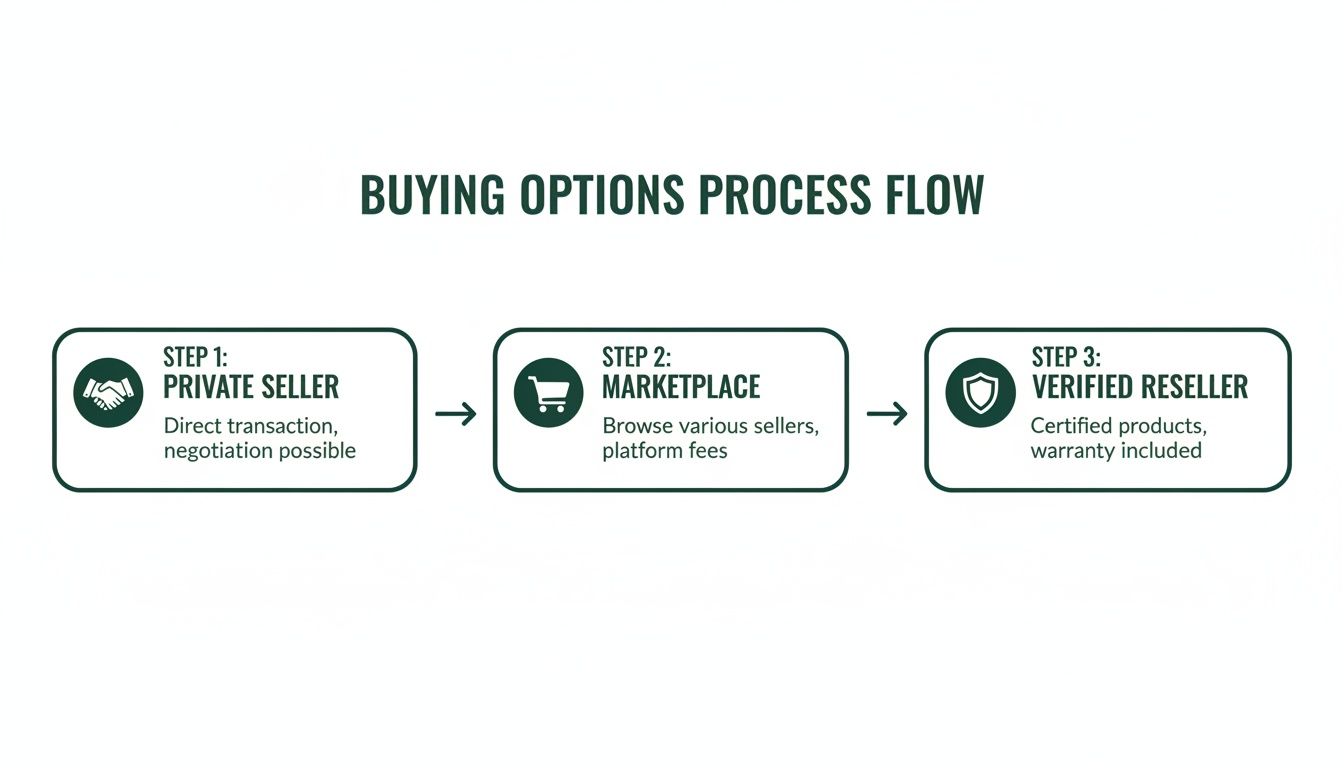
So, you’re ready to hunt down the perfect used iPhone in Australia. Knowing where to look is half the battle, because the options can feel pretty overwhelming—from massive online stores to the bloke down the street on Facebook Marketplace.
Each has its pros and cons, especially when it comes to safety, price, and your own peace of mind. Let’s break down the most popular spots to find a deal and see how they really stack up.
Online Marketplaces: The Digital High Street
For most Aussies, the search for a used iPhone starts online. It makes sense—you get a massive selection, competitive prices, and you can do it all from your couch. But it’s crucial to understand that not all online sellers are created equal.
The market for used iPhones in Australia is huge, which isn't surprising when you look at the numbers. Australia has one of the highest iPhone market shares in the world, hitting a whopping 54.9% in 2025. This shows just how much we love the iOS ecosystem, creating a lively second-hand market for anyone looking for a smart deal. You can explore the latest iPhone user statistics to see the full picture.
This popularity means you’ve got plenty of choices, but it also means you need to be careful about where you buy.
- Verified Marketplaces (like Trade.com.au): Think of these as specialised stores for pre-owned and refurbished tech. Every single device is professionally inspected, wiped clean of old data, and given a clear quality grade before it's even listed. You get the huge selection of an online marketplace with the trust and security you'd expect from a proper retailer.
- General Classifieds (like Gumtree): These sites are just noticeboards connecting you directly with private sellers. You can sometimes snag a real bargain, but you're buying 'as is' from a stranger. There’s no professional testing, zero warranty, and a much higher risk of running into scams or phones with hidden problems.
The key difference is verification. A verified marketplace is your trusted middleman, making sure the phone you get is exactly what was advertised and works perfectly. It’s easily the safest way to buy a used iPhone online.
Local Sellers: The Neighbourhood Deal
Another well-trodden path is buying from someone in your local area, usually through platforms like Facebook Marketplace. The biggest plus here is obvious: you can see and touch the phone before you hand over any cash.
That hands-on approach can feel a lot safer than buying something sight-unseen online. You get to check for scratches, test the buttons, and make sure the screen looks right. But don't let that fool you—this method still comes with some serious risks.
Remember, you're dealing with a private individual, not a business. That means:
- No Warranty: The second you walk away, the deal is done. If the phone develops a fault a week later, you have absolutely no comeback.
- Limited Protection: You're not covered by the usual consumer protections or return policies you get when buying from a registered business.
- Safety Concerns: Meeting up with strangers to exchange a high-value item always requires caution. Make sure you meet in a busy, public place during the day.
For a deeper dive into all your options, check out our guide on where to buy refurbished iPhones in Australia.
To make the decision a bit easier, here’s a quick table comparing the main platforms.
Comparing Buying Platforms
| Buying Platform | Security & Verification | Typical Price | Warranty & Support | Best Suited For |
|---|---|---|---|---|
| Verified Marketplaces | High (professional testing, IMEI checks, data wiped) | Competitive | Excellent (12-month warranty, returns) | Buyers who want security, value, and peace of mind. |
| General Classifieds | Very Low (no verification, high scam risk) | Low to Medium | None | Bargain hunters who are willing to accept high risk. |
| Local Sellers | Low (physical inspection is possible, but no guarantees) | Low | None | People who prefer in-person transactions and accept the risks. |
Ultimately, while you might find a rock-bottom price with a private seller, you’re giving up all the safety nets that make buying a used device a stress-free experience. A verified marketplace like Trade.com.au hits the sweet spot, giving you great online prices with the critical security of professional testing and a solid warranty.
Your Pre-Purchase Checklist: How to Inspect a Used iPhone
Ready to hunt for a used iPhone? Fantastic. Knowing exactly what to look for is the difference between snagging a brilliant deal and inheriting someone else's headache. This guide will walk you through the essential checks, turning you into a confident buyer who can spot a lemon from a mile away.
Think of this as your pre-purchase inspection for your potential new phone. By the end, you'll know how to spot the red flags and make a smart, informed choice.
Step 1: The Physical Checkup
First impressions count, even with phones. Start by giving the iPhone a good, close look under bright light. You're not just looking for a few cosmetic scuffs; you're hunting for signs of serious damage or dodgy, unprofessional repairs.
Minor scratches on the body are pretty standard for a used device and won't affect how it works. But keep an eye out for deep scratches on the screen, cracks in the back glass, or nasty dents on the corners—these could all point to a significant drop.
Here’s your focus list:
- Screen: Check for any deep scratches, cracks, or discolouration. A good trick is to turn the phone on and look for dead pixels or bright spots on a plain white or black background.
- Body and Frame: Run your fingers along the metal frame, checking for dents or bends. A bent frame is a massive red flag.
- Camera Lenses: Make sure the front and back camera lenses are clean and free from any scratches or cracks.
- Ports and SIM Tray: Have a quick peek into the charging port for any gunk or damage. Pop the SIM tray out to see if it ejects smoothly.
Pro Tip: One of the sneakiest issues to spot is hidden water damage. Check the Liquid Contact Indicator (LCI) which is usually tucked away inside the SIM card slot. It should be white or silver. If you see any red or pink, the phone has had a swim at some point, and you should walk away immediately.
Step 2: The Functional Test Drive
Once the physical inspection is out of the way, it’s time to see how the phone actually performs. This is where you put all the essential features through their paces to make sure everything works as it should. Don't be shy—give every function a proper go.
Start with the basics. Press every single physical button—volume up, volume down, and the side button. You should feel a responsive, satisfying click. If a button feels mushy or gets stuck, it could be a sign of internal wear or damage.
Next, power through these critical functions:
- Touchscreen: Open the Notes app and just scribble all over the screen with your finger. You're looking for any "dead spots" where your touch doesn't register.
- Cameras: Fire up the camera app. Switch between the front and back lenses, snap a few photos, and record a short video.
- Speakers and Microphones: Record a quick voice memo to test the microphone. Then, play it back to check the speaker quality.
- Connectivity: Try connecting to a Wi-Fi network. If you can, flick on Bluetooth to see if it picks up any nearby devices.
- Face ID or Touch ID: This is a deal-breaker. Dive into the Settings and try to set up Face ID or Touch ID. If it fails, it could mean a faulty sensor or, worse, an unauthorised screen replacement.
As a final part of this check, make sure all the simple functions work as expected. This includes knowing how to screen shot on your iPhone to confirm the buttons and display capture are working together perfectly.
Step 3: The All-Important Software Deep Dive
This last step is arguably the most crucial. A phone can look pristine and seem to work fine, but hidden software locks or a dying battery can turn it into a glorified paperweight. This is your check for the phone's digital health and identity.
First up, you need to be sure the iPhone isn't stolen or blocked from Aussie networks. The easiest way to do this is by checking its IMEI (International Mobile Equipment Identity) number. Just open the phone app and dial *#06#—the number will pop right up on the screen.
With the IMEI in hand, you can use a checker tool to confirm its status. To really get to grips with this vital step, we have a detailed guide on how to complete an AMTA IMEI check in Australia and make sure the device isn’t on a blacklist.
Finally, there are two last critical areas to check inside the Settings app:
- Activation Lock: Head to Settings > [Your Name]. If you see the previous owner's name and Apple ID, stop right there. The phone is still locked to their account, and you won't be able to use it. The seller must sign out completely before you buy it.
- Battery Health: Navigate over to Settings > Battery > Battery Health & Charging. The "Maximum Capacity" percentage tells you how much life the battery has left. For a used iPhone, anything above 85% is generally considered pretty good.
How iPhone Models And Condition Affect Price
Trying to figure out the price tag on a used iPhone can feel a bit like guesswork, but there’s a solid logic to it once you know the key ingredients. It really boils down to three things: the specific model, its storage size, and its cosmetic condition.
Think of it like buying a used car. The year and model—say, an iPhone 14 versus an iPhone 11—set the baseline price. From there, the storage and physical shape fine-tune the final number. A newer model with more gigabytes and a flawless screen will always be worth more than an older one with a few battle scars.
Get a handle on these three elements, and you’ll know exactly how to set a realistic budget and, more importantly, how to spot a genuinely great deal.
The Model And Storage Tiers
First up, the model itself is the biggest price driver. An iPhone 14 will naturally cost more than an iPhone 11. It’s got a faster chip, a more advanced camera, and it’s going to be supported with Apple’s software updates for much longer.
Within each model, you’ve got another price tier based on storage. An iPhone with 256GB of space is going to be more expensive than the exact same phone with only 64GB. If you’re the type who downloads a lot of apps, takes heaps of photos, or shoots video, spending that little bit extra on more storage is always a smart move.
Here’s a simple way to think about the different models:
- Flagship Models (1-2 years old): This is where you find the biggest savings compared to buying new, while still getting a device that feels current. Think of an iPhone 13 Pro—it’s an absolute powerhouse that offers incredible value.
- Mid-Range Models (3-4 years old): Models like the iPhone 12 or 11 are fantastic all-rounders. They strike the perfect balance between modern features and affordability, making them a go-to for students or everyday users.
- Budget Models (Older than 4 years): Don't discount the older guys. Devices like the iPhone XR or SE are brilliant entry-level options. They still run the latest iOS smoothly and are perfect for basic use or as a dependable second phone.
Understanding Cosmetic Condition Grades
After the model and storage, the final piece of the pricing puzzle is the phone’s physical condition. Any reputable seller, like Trade.com.au, uses a clear grading system to describe what the phone looks like. This is super helpful because it cuts out the guesswork and tells you exactly what to expect.
It’s important to know these grades are purely cosmetic—they have zero impact on how the phone works. Every device is 100% tested and fully functional; the grade just describes any visual wear and tear.
The grading system is your secret weapon for finding amazing value. If you don’t mind a few minor scuffs that will be hidden by a case anyway, you can save a serious amount of cash on the exact same phone by choosing a 'Good' or 'Fair' condition.
Here’s a typical grading scale you’ll come across:
- As New: The phone looks perfect. No visible signs of use. It’s the closest you can get to unboxing a brand-new device.
- Excellent: Might have a few tiny, faint scratches that you’d have to look for to even notice. It's in fantastic shape.
- Good: Shows some signs of normal, everyday use. Think small scratches or light scuffs on the body or screen.
- Fair: This device works perfectly but won't win any beauty contests. It will have more obvious cosmetic wear, like visible scratches or small dinks.
By balancing these three factors—model, storage, and condition—you can pinpoint the perfect used iPhone that fits your needs and your budget like a glove. It’s the smartest way to get the best possible value and often saves you hundreds of dollars compared to buying new.
Understanding Your Warranty And Consumer Rights
So, you’ve checked the phone out, agreed on a price, and you’re ready to pull the trigger. But what happens after you’ve handed over your money? This is where the difference between a risky private sale and buying from a proper business becomes incredibly clear.
When you buy a used iPhone from a stranger on Gumtree or Facebook Marketplace, the deal is pretty much final the second the cash is exchanged. If the screen goes on the fritz a week later, you’ve got almost no way to get your money back. That’s a massive gamble, especially with a device that can still cost hundreds of dollars.
This is exactly why choosing a reputable business is the smartest play for your peace of mind. You’re not just buying a phone; you’re buying the confidence that comes with a solid warranty and the full backing of Australian law.
What A Good Warranty Looks Like
A warranty is simply a seller’s promise to stand by the product they sold you. When you're buying used iPhones Australia, this promise is everything. It's the difference between a secure purchase and a potential paperweight. Any seller worth their salt will offer a clear, straightforward warranty that covers you for unexpected faults.
For example, here at Trade.com.au, every single device we sell comes with a free 12-month warranty. This isn't some optional add-on; it's our standard because we believe in the quality of our products.
A solid warranty should cover:
- Manufacturing Defects: This includes any hardware failures that aren't your fault, like problems with the battery, screen, or other internal components.
- Functional Failures: If key features like Face ID, the camera, or the buttons suddenly stop working, a good warranty has your back.
- Clear Terms: You should be able to easily find and understand how long the warranty lasts, what’s covered, and how to make a claim.
Think of a warranty as built-in insurance for your purchase. It ensures that if something unexpected goes wrong with the phone’s hardware, you won’t be left out of pocket for expensive repairs or a replacement.
Your Rights Under Australian Consumer Law
Beyond the warranty a seller offers, you also have powerful protections as a buyer in Australia. When you purchase goods from a business—and yes, this includes second-hand items—you are automatically covered by Australian Consumer Law (ACL).
The ACL provides a set of consumer guarantees which ensure the products you buy are of "acceptable quality." In simple terms, this means the device must be fit for purpose, safe, durable, and free from defects. If a used iPhone you buy from a business develops a major fault soon after you get it, you are legally entitled to a solution, which could be a repair, replacement, or refund.
This powerful protection simply doesn't exist when you're buying from a private individual, which really highlights the risk you take with those kinds of deals. Choosing a verified reseller like Trade.com.au means you get both our direct warranty and the full protection of your consumer rights, giving you complete confidence in your new device.
How To Trade In Your Old Phone For Cash
Before you jump into buying your next used iPhone, what's the plan for your old one? Letting it gather dust in a drawer is a bit like leaving cash on the table. Trading it in is a brilliant way to fund your upgrade, and it’s a lot simpler than most people think.
The benefits here are twofold. On one hand, you get instant cash or credit to put towards your new device, making that upgrade even more affordable. On the other, you're giving your old phone a new lease on life, which is a massive win for reducing e-waste right here in Australia.
Platforms like Trade.com.au have made the whole process incredibly straightforward. You can get a quick quote online, send your device in, and get paid. It's a smooth, responsible way to manage your tech.
Maximising Your Trade-In Value
Getting the best possible price for your old phone isn't about luck; it's all about preparation. A few simple steps can seriously boost your payout. Think of it like getting your car ready for sale—a little bit of effort goes a long way. For those looking to upgrade, understanding how to maximize your used phone value in Australia can make a real difference to your return.
Start with the basics. A clean phone just looks better and suggests it’s been well cared for. Give the screen and body a gentle wipe-down with a microfibre cloth. If you still have the original box and accessories, like the charger and cable, including them can often add a bit more value to your trade-in.
The Essential Pre-Trade Checklist
Before you send your old companion on its way, there are a couple of non-negotiable steps you absolutely must take. This is all about protecting your privacy and making sure the handover is completely seamless for everyone involved.
Here’s your quick and easy checklist:
- Back Up Your Data: This is the most critical step. Use iCloud or plug into a computer to back up all your photos, contacts, and apps.
- Sign Out of Everything: Jump into Settings and sign out of your Apple ID and iCloud. This is what removes the Activation Lock, and it's essential for the phone to be usable for the next person.
- Perform a Factory Reset: Once you're certain everything is backed up and you've signed out, head to Settings > General > Transfer or Reset iPhone and hit "Erase All Content and Settings." This wipes the device completely clean.
- Assess Its Condition Honestly: When getting a quote, be real about the phone's condition. Are there scratches on the screen? Dents on the corners? An accurate description ensures the quote you receive matches the final offer.
Following these tips will help you get the most money back for your device. For a complete walkthrough, you can learn more about how to trade in your phone for cash and make your next upgrade even sweeter.
Still Got Questions? We’ve Got Answers.
Got a few last-minute questions buzzing around? You’re not the only one. Deciding to buy a used iPhone is a brilliant move, but it’s completely normal to want all the details before you jump in. This section tackles the most common queries we get from Aussie buyers just like you.
Let's clear up any lingering doubts with some straightforward answers, so you can make your final choice with total confidence.
What’s The Difference Between a ‘Used’ and a ‘Refurbished’ iPhone?
This is a big one, and the distinction is crucial. A used iPhone is usually sold 'as is' by a private person on a marketplace. It hasn’t been professionally tested or certified, which means you’re taking a gamble on its condition and history.
A refurbished iPhone, on the other hand, is a pre-owned device that has been returned to a professional reseller like Trade.com.au. It goes through a rigorous testing process where any faulty parts are professionally repaired or replaced. After that, it’s cleaned up, graded based on its cosmetic condition, and sold with a solid warranty.
Think of it like this: a 'used' phone is like buying a car directly from the previous owner with no inspection. A 'refurbished' phone is like buying a certified pre-owned car from a dealership—it has been professionally checked, serviced, and comes with a guarantee.
What Should I Expect From The Battery Life?
Battery health is a top concern for anyone buying a pre-owned phone. A brand-new iPhone leaves the factory with 100% battery capacity, but this naturally goes down over time with every charge cycle.
For any quality used or refurbished iPhone, you should be looking for a device with a battery health of 85% or higher. This is the sweet spot that ensures the battery can still hold a solid charge and will comfortably get you through a full day of normal use. At Trade.com.au, we make sure all our devices meet strict battery health standards, so you’re never left with a phone that’s dead by lunchtime.
Can I Use an eSIM in a Used iPhone?
Absolutely! Most recent iPhone models are built to be eSIM compatible, and this feature works flawlessly on used and refurbished devices. An eSIM, or embedded SIM, is a digital SIM that lets you set up a mobile plan without needing to fiddle with a tiny physical SIM card.
It’s a fantastic feature, especially if you travel. You can have multiple plans on a single phone—for instance, keeping your regular Aussie number while using a local data plan when you’re overseas. Just make sure the iPhone model you’re buying supports eSIM functionality (generally the iPhone XR/XS and anything newer).
Ready to find a premium iPhone without the premium price tag? At Trade.com.au, every device is professionally tested, data-wiped, and backed by a 12-month warranty for your peace of mind. Explore our range of certified refurbished iPhones today!